
OVERVIEW
As part of the wider BPP mobile app experience, I worked on designing a “Raise a Query” flow aimed at helping students quickly access support for issues related to finance, accounts, and general administration.
The goal was to reduce friction in the support journey by encouraging self-service first, while still allowing students to submit a query when needed.
THE PROBLEM
Students often struggled to:
Know where to go for support
Find the correct contact point for different issues
Access relevant help content quickly
Track existing support requests
At the same time, support teams were receiving large volumes of repetitive queries that could potentially be resolved through clearer guidance or self-service support.
PROBLEM STATEMENT
Students needed a simpler and more guided way to resolve support issues without relying entirely on manual support channels.
RESEARCH & INSIGHTS
Research and support analysis revealed several recurring behaviours:
Students often raised support tickets before attempting self-service
Many queries were repetitive and related to existing help centre content
Students lacked confidence in whether they were selecting the correct support category
Duplicate queries created operational inefficiencies for support teams
These insights shaped the direction of a more guided and intelligent query-raising experience.
CONTINUOUS INSIGHT & ITERATION
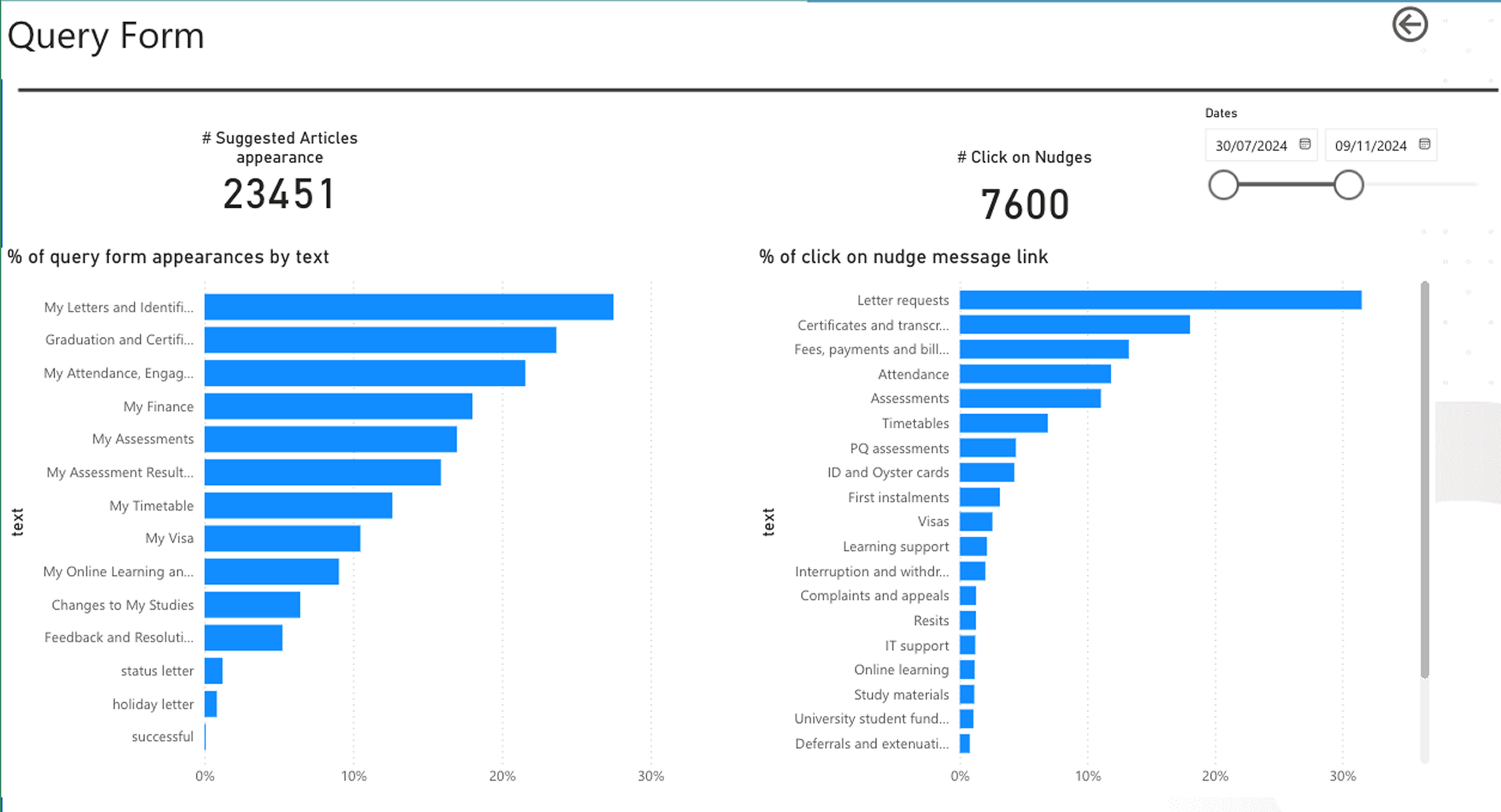
The query flow also became a valuable source of behavioural insight. By regularly monitoring the most common support requests submitted through the form, we were able to identify recurring student pain points and areas of confusion across the wider BPP experience.
This data helped inform:
future product priorities
improvements to help centre content
chatbot training opportunities
UX improvements across related journeys
operational focus areas for support teams
The query data created an ongoing feedback loop, allowing us to continuously refine the experience based on real student behaviours and needs.
DESIGN GOALS
The experience was designed to:
Encourage self-service before escalation
Reduce duplicate or unnecessary support tickets
Help students navigate support categories more confidently
Provide reassurance throughout the journey
Maintain a clear escalation path if self-service failed
THE SOLUTION
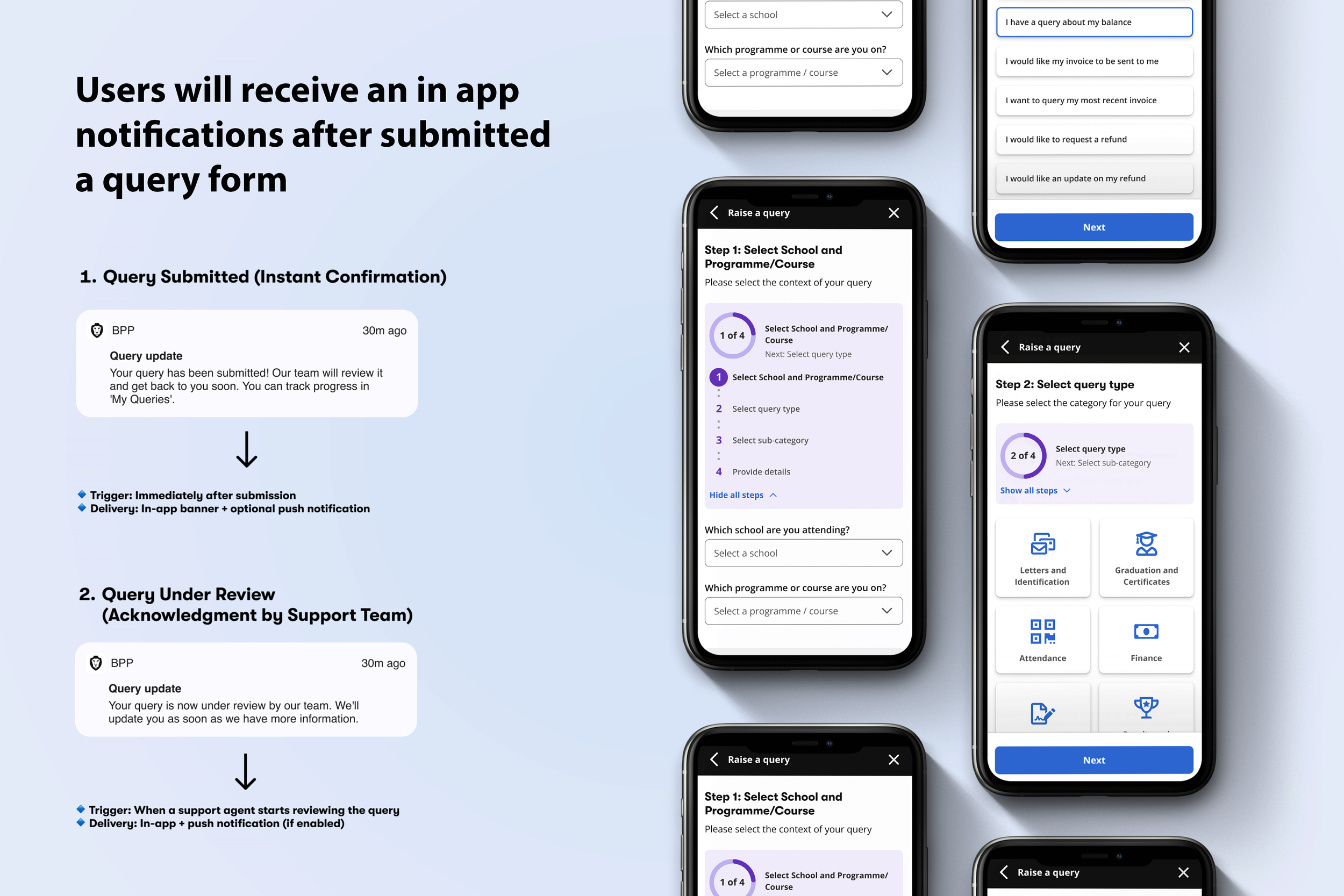
I designed a multi-step support flow that progressively guided students through the query journey.
Key Features
Course and programme selection to personalise support options
Query categorisation and sub-categories
Contextual help centre nudges throughout the flow
Confirmation prompts after viewing support articles
Duplicate query detection for existing open tickets
File upload support for evidence/documents
Success and error handling states
The experience aimed to balance usability with operational efficiency by encouraging self-service before escalation.
Figma prototype
KEY LEARNINGS
One of the biggest learnings from the project was that we had made it too easy for students to raise support tickets.
While the experience reduced friction, it also increased support demand and encouraged users to bypass self-service content.
This became an important product insight:
removing friction entirely can unintentionally increase operational load.
EVOLUTION OF THE EXPERIENCE
As the platform evolved, BPP introduced an AI chatbot capable of answering many common student questions instantly.
The support journey shifted to:
Chatbot-first support
Self-service guidance
Escalation to “Raise a Query” only when needed
This created a more scalable support model while still maintaining a strong student experience.
REFLECTION
This project strengthened my understanding of:
service design and operational UX
balancing user needs with business efficiency
intelligent escalation patterns
designing self-service experiences at scale
It also reinforced that good UX is not always about removing every barrier — sometimes it’s about guiding users toward the right outcome.